Cues
What are Cues?
Cues are contextual, just-in-time nudges that appear within your end users’ flow of work to guide them toward the next steps. They provide guidance that supports the user’s task without interrupting their workflow or blocking the screen.
Cues bring AI directly into the user’s workflow, showing the next actions and proactive guidance at the exact moment the end user needs support.
The following GIF shows a Cue nudging users in Microsoft Dynamics 365 to close overdue opportunities. When users click the button in the Cue, it triggers an automated Flow that opens Copilot, inserts a predefined prompt, and instantly provides insights to help them take action. If users overlook overdue opportunities, the Cue appears at the right moment to guide them.

How do Cues work?
- Cues appear as a slide-in card on the screen.
- Each Cue contains a short message and can include up to two buttons, enabling end users to quickly take the suggested next step. You can open different types of Whatfix content, including Flows, Links, and Videos using the buttons in Cues.
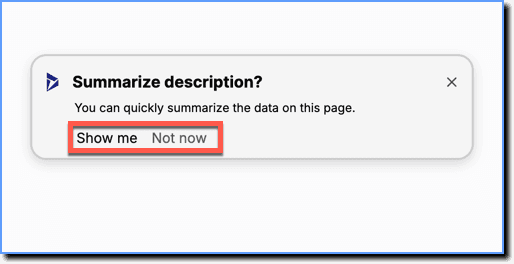
- Cues are non-intrusive and appear only when the defined Visibility Rules are met. Whatfix enables you to trigger Cues based on all the available New Visibility Rules, including Intent Matching using Text.
Enable Cues
Cues is a Beta feature. To enable the feature, contact your Customer Success Manager.
Use cases for Cues
Encourage AI tool adoption
Show timely suggestions that help end users understand when an AI tool can assist with their current task.
Example:
When a user opens a high-value opportunity page in Microsoft Dynamics 365, a Cue appears suggesting they use an Automated Flow to open an AI tool and generate an outreach email.
Guide users during critical steps
Trigger Cues when key fields, buttons, or sections on the screen meet certain conditions, helping users complete important steps correctly.
Example:
If a required description field is left empty, a Cue appears prompting the user to open a Support article.
Respond to user sentiment
Use AI to detect intent or sentiment in text entered by end users and display a Cue when they express confusion, dissatisfaction, or hesitation.
Example:
If end users type uncertain or negative text in a comments field, a Cue appears offering troubleshooting guidance as a Support link.
The feature release stage in which functionality is made available to a limited group of users for testing and feedback. Beta features are generally stable but may still undergo changes before becoming Generally Available (GA).
Your Customer Success Manager (CSM) is your direct contact for features involving specific customer agreements, such as using AI features.