Whatfix Web Overview
How to Install the Whatfix Studio
Whatfix Studio is a browser extension that enables you to create various types of Whatfix content, such as Flows, Smart Tips, Beacons, Pop-ups, and more.
Note:
- The Studio extension can only be installed on Google Chrome and the new Microsoft Edge browsers. It is used only by content creators who are creating content on Whatfix.
- Once the content is published, it can be viewed in any browser. For more information, see Browser Compatibility.
Use the following steps to install Whatfix Studio:
- Open your preferred browser (Google Chrome or the new Microsoft Edge), and then log in to your Whatfix account.
- On the Whatfix Guidance dashboard, click the Install studio to create content link on the banner.
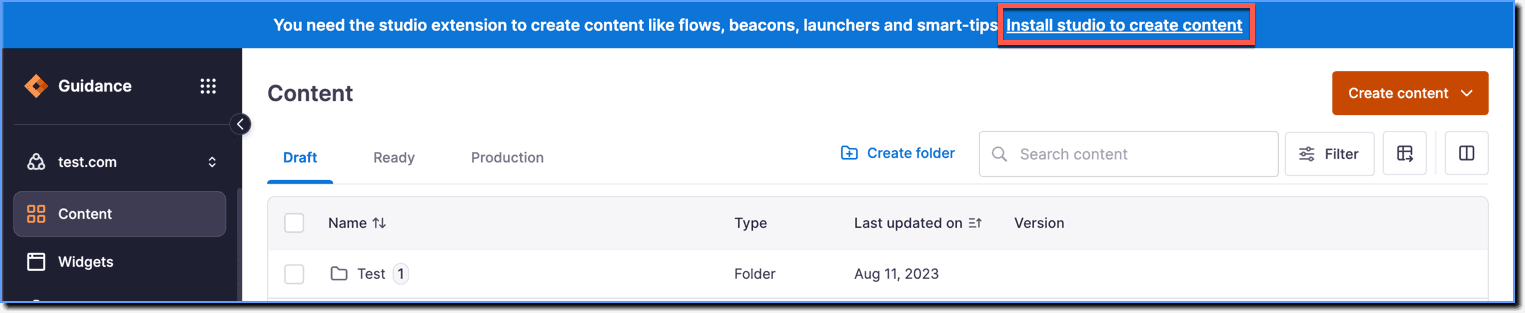
Note:
- In case you are unable to see the banner, click the following links based on your browser and install the Whatfix Studio extension: For Whatfix Studio (US) a. Whatfix Studio for Chrome b. Whatfix Studio for Edge For Whatfix Studio (EU) a. Whatfix EU Studio for Chrome b. Whatfix EU Studio for Edge
- If you have already installed Whatfix Studio, you won't be able to see the banner on your dashboard. For more information, see Unable to see the Install Studio banner.
- Follow the on-screen prompts to finish the installation.
Note:
- Installation steps might vary depending on your browser.
- If you have the Whatfix US dashboard (https://whatfix.com/account_name), you have to use the Whatfix Studio US version to create content. If you have the Whatfix EU dashboard (https://eu.whatfix.com/account_name), you have to use the Whatfix Studio EU version to create content. For more information, see Can I use both US and EU Studio Editors simultaneously?
Info:
In newer versions of the Chrome browser, you don't see the Studio extension after installation unless you pin the extension to the browser toolbar.
Use the following steps to pin the Whatfix Studio extension:
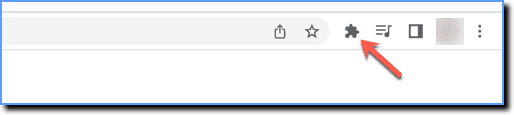
- On the browser toolbar, click the Extensions icon.
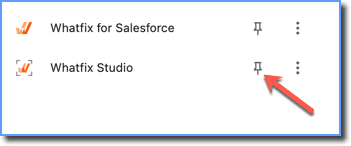
- Under extensions, next to Whatfix Studio, click the Pin extension icon to make it appear on the toolbar.
Here's a video demonstrating how to install Whatfix Studio: