Trend Insights
Filter events using Event Filters and Breakdown in Trend insights
Whatfix Events are triggered when your end-users interact with the Mirror.
Trend Insights are auto-created on the Whatfix analytics dashboard after you finish creating a Mirror.
Both events, Default and Custom, contain Filters so they can be drilled based on different criteria. Events can be modified according to various properties using the Breakdown module. Event Filters and Breakdowns ensure that you are limiting the scope of the Event based on your requirements. Use these filters to view specific data in the form of charts. For example, view the number of users using the Chrome browser, filtered by the country from which they launched the Mirror. Also, view the number of users who accessed the Mirror screens.
Event: WORKFLOW_START_MIRROR
Event Filter: folder_id
Event Breakdown: page_url
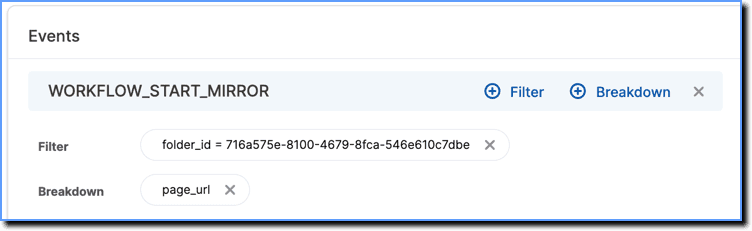
The following are the Filters and Breakdowns available for Mirror in Trend Insights:
Mirror
| Event | Event Filter and Event Breakdown | Description |
|---|---|---|
| WORKFLOW_START_MIRROR | folder_id | The ID of the Mirror workflow. |
| page_url | The URL of the Mirror workflow. | |
| WORKFLOW_END_MIRROR | folder_id | The ID of the Mirror workflow. |
| page_url | The URL of the Mirror workflow. |
All Mirrors you create appear with a specific folder ID, which can be located within the Mirror's URL. For more information, see Where do I find the Mirror workflow ID?
Trend Insights turns your engagement-related queries, such as the number of users who have completed Flows or the number of users who have clicked the button on your Pop-up, into actionable insights.