Flows
How does On click of another element rule work in Flows?
On click of another element is a step completion rule in Flows. The rule enables users to define another element as a completion element besides the primary step the Flow step is attached to. When users click that other element, the Flow automatically moves to the next step without failing.
On click of another element is currently Beta. Contact support@whatfix.com for more information.
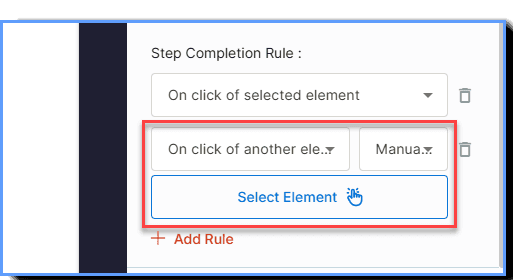
Select this rule On click of another element using Whatfix Studio. Use the Select Element functionality to capture multiple elements that you want to show your users in the Flow.
Use-case: Guided Lead creation
This enhancement solves for complex application layouts, such as pages that feature multiple buttons performing the exact same action. By giving end-users the flexibility to choose their preferred path forward, it helps you to build and support much more advanced, non-linear workflows. For instance, the below use case highlights an action of note creation. There are two ways of doing it, by clicking “New Note” or “New”. Selecting On click of another element during Flow creation ensures your users are guided to the target step of action through any of these two ways, without the Flow breaking.

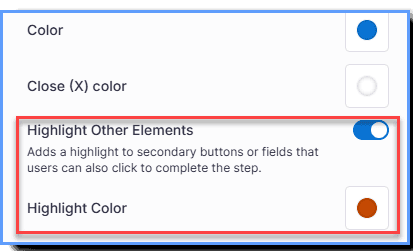
Your end users can also choose to highlight the step with any color that suits their brand guidelines.
The feature release stage in which functionality is made available to a limited group of users for testing and feedback. Beta features are generally stable but may still undergo changes before becoming Generally Available (GA).
Whatfix Studio is a browser plug-in that enables you to create various types of Whatfix content, such as Flows, Smart Tips, Beacons, and so on. The plug-in can be installed on Google Chrome and the new Microsoft Edge browsers.