Use Cases for publishing using Project ID
Auto start sub Flow in a Walkthrough Checklist
- Overview
- Step 1: Generate the Project ID of the Checklist project
- Step 2: Generate the Project ID of the Sub-Flow project
- Step 3: Generate a new Project ID combining the Checklist and the Sub-Flow Project IDs
- Step 4: Start the Sub-Flow
Overview
In the Walkthrough Checklist, whenever a Sub-Flow is completed, there is a check mark to show that the Sub-Flow is completed. If there is a requirement to auto start a Sub-Flow and achieve the same behavior as that of a Checklist, the Sub-Flow needs to be started by its project ID prefixed with its checklist project ID.
Use the following steps to auto start a Sub-Flow in a Walkthrough Checklist:
Info:
- If the Sub-Flow is started only with its project ID, it is considered as an independent Project and not part of the Checklist.
- For more information about generating a project ID, see Publish using Project ID.
Step 1: Generate the project ID of the Checklist project
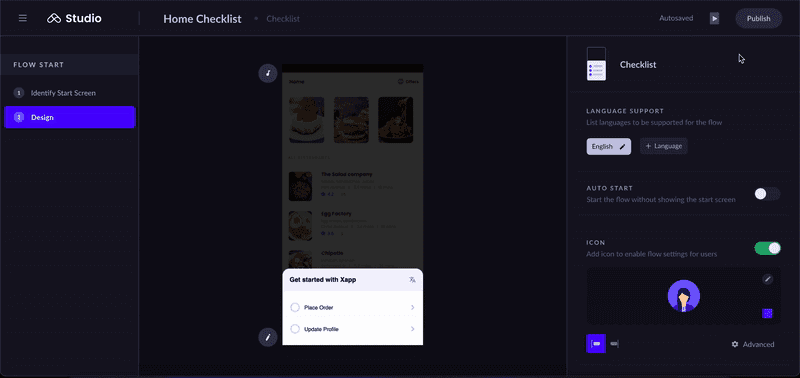
Step 2: Generate the project ID of the Sub-Flow project
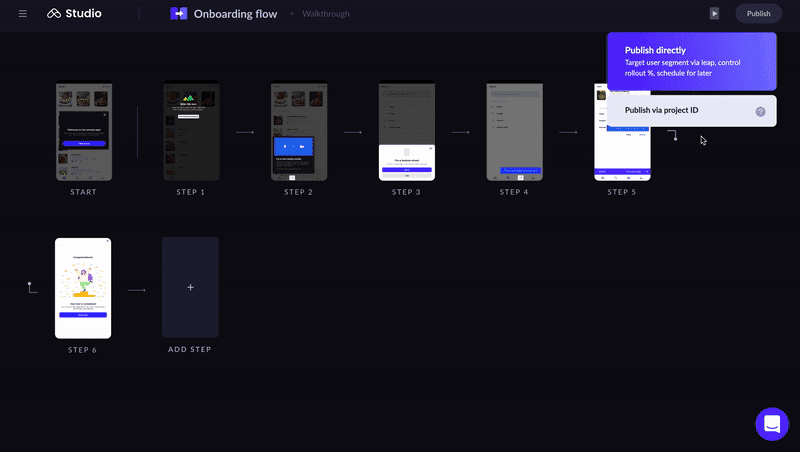
Step 3: Generate a new project ID combining the Checklist and the Sub-Flow project IDs
Combine the Checklist project ID and the Sub-Flow project ID separated by #.
For example, if the Checklist project ID is 87b73d04-da5d-4ea6-8b71-8fed700157bb and the Sub-Flow’s project ID is 33c6abcc-a077-4cae-9c45-33a6c730fba4. The new project ID is the combination of the Checklist project ID and the Sub-Flow project ID separated by #, i.e., 87b73d04-da5d-4ea6-8b71-8fed700157bb#33c6abcc-a077-4cae-9c45-33a6c730fba4.
Step 4: Start the Sub-Flow
Use the following code snippets to start the Sub-Flow:
Android
Android
Leap.embedProject("<CHECKLIST_PROJECT_ID>#<SUBFLOW_PROJECT_ID>");

// e.g - Leap.embedProject("87b73d04-da5d-4ea6-8b71-8fed700157bb#33c6abcc-a077-4cae-9c45-33a6c730fba4");
iOS Swift
iOS Swift
Leap.shared.embedProject("<CHECKLIST_PROJECT_ID>#<SUBFLOW_PROJECT_ID>");

// e.g - Leap.shared.embedProject("87b73d04-da5d-4ea6-8b71-8fed700157bb#33c6abcc-a077-4cae-9c45-33a6c730fba4");
iOS Objective-C
iOS Objective-C
[[Leap shared] embedProject:@"<CHECKLIST_PROJECT_ID>#<SUBFLOW_PROJECT_ID>"];

// e.g - [[Leap shared] embedProject:@"87b73d04-da5d-4ea6-8b71-8fed700157bb#33c6abcc-a077-4cae-9c45-33a6c730fba4"];
ReactNative
ReactNative
LeapReactNative.embedProject("<CHECKLIST_PROJECT_ID>#<SUBFLOW_PROJECT_ID>");Ionic
Ionic
LeapPlugin.startProject({projectId:"<CHECKLIST_PROJECT_ID>#<SUBFLOW_PROJECT_ID>"});Cordova (Android)
Cordova (Android)
cordova.plugins.LeapAndroid.embedProject("<CHECKLIST_PROJECT_ID>#<SUBFLOW_PROJECT_ID>");

// e.g - cordova.plugins.LeapAndroid.embedProject("87b73d04-da5d-4ea6-8b71-8fed700157bb#33c6abcc-a077-4cae-9c45-33a6c730fba4");
Cordova (iOS)
Cordova (iOS)
cordova.plugins.LeapiOS.embedProject("<CHECKLIST_PROJECT_ID>#<SUBFLOW_PROJECT_ID>");

// e.g - cordova.plugins.LeapiOS.embedProject("87b73d04-da5d-4ea6-8b71-8fed700157bb#33c6abcc-a077-4cae-9c45-33a6c730fba4");
Xamarin Android
Xamarin Android
Leap.EmbedProject("<CHECKLIST_PROJECT_ID>#<SUBFLOW_PROJECT_ID>");

// e.g - Leap.EmbedProject("87b73d04-da5d-4ea6-8b71-8fed700157bb#33c6abcc-a077-4cae-9c45-33a6c730fba4");
Xamarin iOS
Xamarin iOS
Leap.Shared.EmbedProject("<CHECKLIST_PROJECT_ID>#<SUBFLOW_PROJECT_ID>");

// e.g - Leap.Shared.EmbedProject("87b73d04-da5d-4ea6-8b71-8fed700157bb#33c6abcc-a077-4cae-9c45-33a6c730fba4");
Info:
The Sub-Flow can also be launched from a notification. For more information see, Launch via Notification. Use Step 3 to generate the new project ID, which is a combination of Checklist and Sub-Flow project IDs.