Group Policy Management Console (GPMC)
Mass Deploy the Whatfix Extension Using GPMC
Read this article to learn how you can deploy a Whatfix extension across all domain-joined Windows machines using an MSI file.
Overview
The Group Policy Management Console (GPMC) is a Microsoft administrative tool used to manage Group Policy Objects (GPOs) across Active Directory environments. Using GPMC, administrators can deploy software packages (such as a Whatfix extension), enforce security settings, and configure user or computer-based policies across domain-joined devices.
Prerequisites:
- You need to download the MSI file from the Whatfix Guidance dashboard and host it in a shared network folder. To generate a single extension file (.msi), see Single Installer for Whatfix Extensions.
- You must use a shared network folder accessible by all target machines with read permissions.
- You must have access to the Group Policy Management Console (GPMC) on a Windows Server or admin machine.
Deploy the Whatfix Extension
Use the following steps to deploy the Whatfix extension using GPMC:
- Add the
.msiinstaller file to a shared network folder (for example,\\YourServer\Share\whatfix-extension.msi). - Open the GPMC tool and create or edit an existing Group Policy Object (GPO).
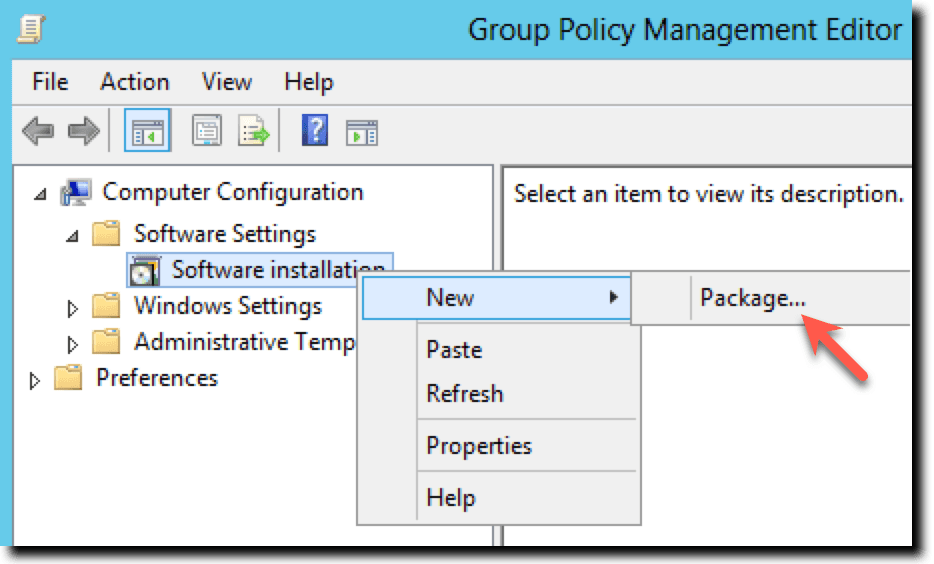
- Click Computer Configuration.
- Click Software Settings, and then click Software installation.
- Right-click Software Installation and choose New, and then click Package…
- Go to the shared network path and select the Whatfix
.msifile.
Use the full path to the MSI file (for example, \\YourServer\Share\whatfix-extension.msi). Do not use local paths.
- Choose Assigned as the deployment method.
Once you’ve created or edited a Group Policy Object (GPO) in GPMC, you need to apply it to a specific group of computers in your Active Directory. This is called an Organizational Unit (OU).
- Link the GPO to the appropriate Organizational Unit (OU) containing the target machines.
For more information, refer to Use Group Policy to remotely install software.