Environment Configuration and Stage Mapping
How are the Visibility Rules evaluated while mapping stages?
Note:
Only an Account Manager can perform the following task. For more information about available roles, see Whatfix User Roles.
After inserting the code in your respective instances, you must map the instances under Map Stages so that Whatfix can show the content currently on each instance. Mapping each stage ensures that when you create content, move it to the Ready stage and enable the preview mode, the content is shown on your development instance and when the content is pushed to production, the content displays on your production instance. 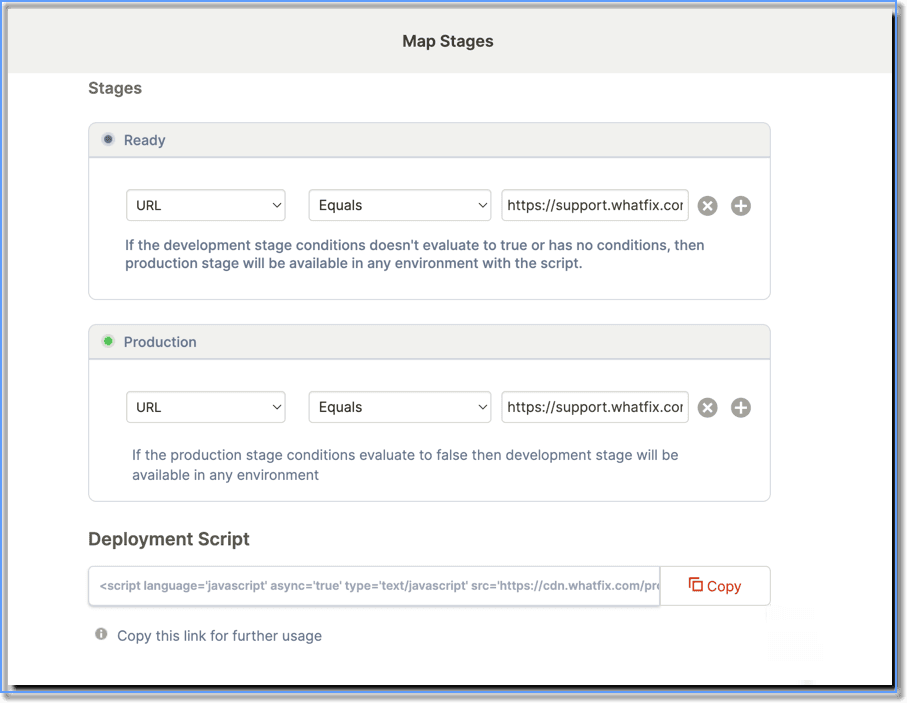
The mapping conditions you set are similar to Visibility Rules. It determines which content needs to be shown in which instance.
However, there can be 5 scenarios based on how the mapping is done. Based on the conditions you use to map your instances, you may face the following scenarios:
Your title goes here
The mapping conditions you enter are evaluated when your users visit the application page. Based on the evaluation of the conditions, Whatfix content from the relevant stage is shown to your users.
| Are the Production mapping conditions valid? | Are the Ready mapping conditions valid? | The stage from which the content is shown |
|---|---|---|
| Yes | Yes | Only the Production stage content is displayed |
| Yes | No | Only the Production stage content is displayed |
| No | Yes | The content present in the Ready stage and the content which is already live in the Production stage are displayed. This is to ensure that the newly created content does not impact the published content. |
| No | No | No content is displayed on either instance |
| NA | NA | No content is displayed on either instance |
Info:
Even if you don't have a Development instance, you must map the Production instance so that when your content is pushed to production, you will see this content in production.