Desktop Translation
Languages supported by Whatfix
The language scripts in the following table are supported by Whatfix.
You can add and manage translations for these languages. However, note that not all languages we support are also supported for auto translation. If you also use auto-translation, look at the Auto Translation Supported column in the same table to understand if auto translation is supported.
For more information, see Microsoft Translator Language Support.
Add and manage translations on the Whatfix Dashboard for the following languages:
| Language | Language Code | Auto Translation Supported |
|---|---|---|
| Arabic** | ar |  |
| Assamese | as | |
| Bengali | bn | |
| Basque | eu | |
| Bulgarian | bg | |
| Burmese | my | |
| Catalan | ca | |
| Cantonese | yue | |
| Chinese | zh | |
| Chinese-Literary | Izh | |
| Chinese Mainland | zh-CN |  |
| Chinese-Simplified | zh-Hans | |
| Chinese-Traditional | zh-Hant | |
| Chinese - Taiwan | zh-TW | |
| Croatian | hr | |
| Czech | cs | |
| Danish | da | |
| Dutch | nl | |
| English* | en | |
| English (Australia) | en-AU | |
| English (India) | en-IN | |
| English (Malaysia) | en-MY | |
| English (Philippines) | en-PH | |
| English (Singapore) | en-SG | |
| English (South Africa) | en-ZA | |
| English (Thailand) | en-TH | |
| English (UAE) | en-AE | |
| English (UK) | en-UK | |
| English (US) | en-US | |
| Estonian | et | |
| Finnish | fi | |
| French | fr | |
| French - Canada | frca | |
| Galician | gl | |
| German | de | |
| Greek | el | |
| Gujarati | gu | |
| Hebrew** | he | |
| Hindi | hi | |
| Hmong | hmn | |
| Hungarian | hu | |
| Icelandic | is | |
| Indonesian | id | |
| Italian | it | |
| Japanese | ja | |
| Kannada | kn | |
| Korean | ko | |
| Latvian | lv | |
| Lithuanian | lt | |
| Malay | ms | |
| Malayalam | ml | |
| Marathi - India | mr | |
| Mongolian | mn | |
| Nepali | ne | |
| Norwegian | no | |
| Persian | fa | |
| Polish | pl | |
| Portuguese | pt | |
| Portugese - Brazil | pt-BR | |
| Portugese - European | pt-PT | |
| Punjabi | pa | |
| Romanian | ro | |
| Russian | ru | |
| Serbian | sr | |
| Sinhala | si | |
| Slovak | sk | |
| Slovenian | sl | |
| Spanish- Argentina | sr | |
| Spanish - Castilian | es-ES | |
| Spanish - Mexican | es-MX | |
| Spanish | es | |
| Swedish | sv | |
| Tagalog | tl | |
| Tamil - India | ta | |
| Telugu | te | |
| Thai | th | |
| Turkish | tr | |
| Ukrainian | uk | |
| Urdu** | ur | |
| Vietnamese | vi | |
| Welsh | cy | |
- *English is the default language.
- **Languages are written right to left.
- To add additional languages (mentioned above) to the list in your account, contact support@whatfix.com.
- The alignment of content on the tip is from Right to Left (RTL).
- While referencing a language code in AC code, any dashes (-) must be omitted, and any uppercase letters must be made lowercase. For example, pt-BR must be typed as ptbr.
How to check the enabled languages for an account?
Use the following steps to check for languages added to an account:
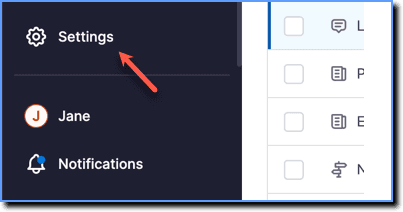
- On the Whatfix Guidance dashboard, click Settings.
- Click Translations.
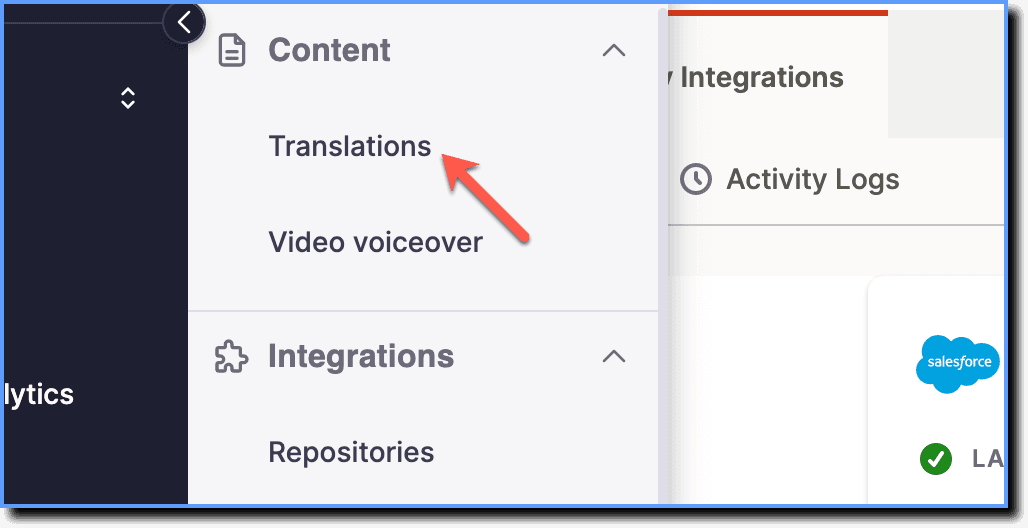
The list of languages enabled for the account appears in the Translations page:

The Whatfix Dashboard is where you can perform the following actions:
- Access all content that has been created by users in your organization.
- Access and manage content widgets like Self Help, Pop-ups, Smart tips, Beacons, and Task List
- Manage users
- Manage tags
- Access Analytics
- Manage translations
- Manage Tip or Flow configurations