Trend Insights
List of Whatfix-related Events
An Event is defined as an end-user interaction and contains contextual information to understand user behavior in an application. There are two types of events in Whatfix:
- Guidance or Default event
- App or Custom event
Guidance events**:** All events generated for Whatfix Content and widget interaction. App events**:** User-defined events such as User Actions, events captured using Whatfix API, and more.
- Whatfix events, both Guidance and App events, appear in the dropdown only after you perform them at least once.
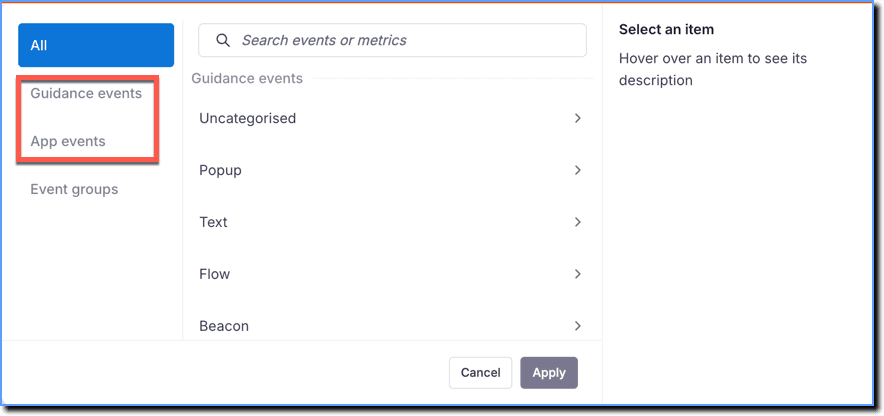
- Guidance or Default events are used in Trend Insights, Event groups, and Cohorts.
- App or Custom events are used in Trend Insights, Funnel Insights, User Journey, Event groups, and Cohorts.
When you create an Insight, view additional details to evaluate an event before you select it. Search for a user action, then hover over it to view details such as Live since, Last interaction, and Used in. Select the user action to view a screenshot with the relevant element highlighted. 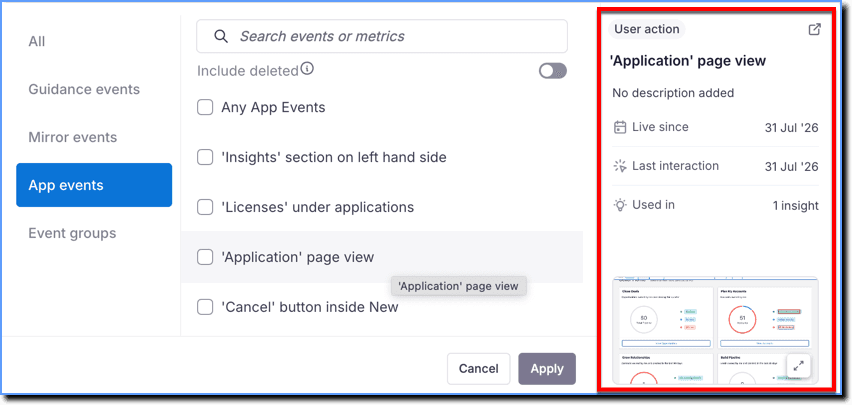
Expand the accordion to view a list of all the Whatfix-related events captured and their descriptions:
Guidance (Default) events - Others
| Event name | Description |
|---|---|
| Any Whatfix Events | Shows the overall end user engagement with any Whatfix content such as Flows, Beacons, Smart Tips, and more. |
| Whatfix for Web Loaded | Triggered when any Whatfix content or widgets load on a specific page where the end user is active. For example, when a Beacon loads on your application, Whatfix tracks this event. |
Flow
| Event name | Description |
|---|---|
| Flow started | Triggered when the end user launches a Flow from Self Help or Task List. |
| Flow step shown | Triggered when a Flow step is shown to the end user. |
| Flow step completed | Triggered when the end user completes a Flow step. |
| Flow backtracked 1 step | Triggered when the end user moves a step back in a Flow. |
| Flow backtracked 1 step and failed | Triggered when the end user moves a step back in a Flow and the Flow fails. |
| Automated Flow stopped | Triggered when a Flow is stopped using the _wfx_close_live() function from the console. |
| Branched Flow started | Triggered when the end user launches a branched Flow. |
| Failed to launch flow step | Triggered when the Flow step fails to appear on an application. |
| Flow Step (automated) Closed | Triggered when an automated Flow step is closed. |
| Flow closed | Triggered when the end user closes a Flow. |
| Flow closed without feedback | Triggered when flow is abandoned midway and the user does not give feedback. |
| Flow closed with feedback | Triggered when flow is abandoned midway and the user gives feedback. |
| Flow completed | Triggered when the end user completes a Flow. |
| Flow Completed with Feedback | Triggered when the end user completes a Flow and gives feedback from the Flow closure feedback message. The Flow closure feedback message appears only if you’ve enabled the Flow closure feedback feature. For more information, see Flow Closure Feedback. |
| Flow completed without feedback | Triggered when the end user closes a Flow and does not provide feedback from the Flow closure feedback message. The Flow closure feedback message appears only if you’ve enabled the Flow closure feedback feature. For more information, see Flow Closure Feedback. |
| Flow resumed | Triggered when the end user moves forward in a Flow. |
| Flow switch to manual | Triggered when an Automated Flow fails and the Flow is switched to manual for the end user’s inputs. |
| Flow slideshow closed | Triggered when the end user closes a Flow slideshow without completing it. The step number at which the user closed the slideshow is also captured. |
| Flow slideshow closed at Step 1 | Triggered when the end user closes a Flow slideshow on the first slide. |
| Flow slideshow completed | Triggered when the end user completes a Flow slideshow. |
| Flow slideshow restarted | Triggered when the end user restarts a Flow slideshow from the last slide. > [!NOTE] > Info: > > A Flow is played as a Slideshow in Self Help and Task List when it is tagged with the nolive tag. |
| Flow slideshow started | Triggered when the end user starts a Flow slideshow. > [!NOTE] > Info: > > A Flow is played as a Slideshow in Self Help and Task List when it is tagged with the nolive tag. |
| Flow step viewed in slideshow | Triggered when the end user moves through the slides (Flow steps) in a slideshow. |
| User transitioned to another flow | Triggered when the end user navigates to another Flow from the first one. |
| Attached flow started | Triggered when two Flows are linked and the end user launches the second Flow from the end message pop-up of the first Flow. |
| Flow end message closed by “X” icon | Triggered when the end user closes the Flow end message using the X icon. |
| Flow end message closed by close button | Triggered when the end user clicks the Close button on the Flow end message when the feedback option is not configured. |
| Flow launched as pop-up | Triggered when a popup is rendered from where user can start Flow > [!NOTE] > Info: > > When a Flow is tagged with the wfx_play_as_popup tag, a Pop-up is shown before the Flow starts playing. |
| Flow Shown as Pop-Up | Triggered when a Flow is displayed as popup on the application. > [!NOTE] > Info: > > When a Flow is tagged with the wfx_play_as_popup tag, a Pop-up is shown before the Flow starts playing. |
Flow with wfx_play_as_popup tag skipped | Triggered when the end user skips a Flow with the wfx_play_as_popup tag. > [!NOTE] > Info: > > When a Flow is tagged with the wfx_play_as_popup tag, a Pop-up is shown before the Flow starts playing. |
| Likert Scale Feedback Responses | Triggered when end users provide feedback on the helpfulness of a Flow using a 5-point scale or input comments in text format. |
Beacon
| Event name | Description |
|---|---|
| Beacon clicked | Triggered when the end user clicks a Beacon on the application. |
| Beacon Shown | Triggered when a Beacon is shown on the application. |
| Beacon Hovered | Triggered when the end user hovers over a Beacon on the application. |
Blocker
| Event name | Description |
|---|---|
| Blocker Shown | Triggered when Blocker is shown on the application. |
| Blocker clicked | Triggered when the end user clicks a Blocker on the application. |
| Blocker hover | Triggered when the end user hovers over a Blocker on the application. |
Pop-up
| Event name | Description |
|---|---|
| Popup Shown | Triggered when Pop-up is shown on the application |
| Pop-up closed by close button | Triggered when the end user closes the Pop-up using a button configured with the Close action. |
| Pop-up closed | Triggered when the end user closes the pop-up configured using wfx_play_as_popup, which appears before a Flow starts. |
| Pop-up closed by “X” icon | Triggered when the end user closes a Pop-up using the X icon. > [!WARNING] > Note > > If end users close a Pop-up by pressing the Escape key on the keyboard, engagement data is captured using the Pop-up closed by “X” icon event. |
| Pop-up skipped | Triggered when the end user skips the Pop-up. |
| “Do not show me again” selected | Triggered when the end user selects the Don’t show me again checkbox in a Pop-up. |
| URL Triggered via Pop-up | Triggered when the end user opens the link attached to a Pop-up. |
| Flow launched from Pop-up | Triggered when a popup is rendered from where user can start Flow. |
| Pop-up carousel slides shown | Triggered when a carousel Pop-up slide is shown to end users. |
QuickRead
| Event name | Description |
|---|---|
| QuickRead feedback | Triggered when an end user provides feedback on a QuickRead response for a search query by clicking the Thumbs up option. |
| QuickRead Links Consumed | Triggered when QuickRead links are accessed by the end user within the QuickRead response. |
| QuickRead response | Triggered when a QuickRead response or an error message is displayed for a search query. |
| QuickRead subject feedback | Triggered when an end user clicks the Thumbs down option on a QuickRead response and submits feedback using the How can we improve? field. End users can provide detailed insights about their experience and issues with the QuickRead answer. |
| QuickRead onboarding "Show me" clicked | Triggered when end user clicks on the Show me button when the QuickRead onboarding experience is shown to the end user |
Smart Tip
| Event name | Description |
|---|---|
| Smart tip shown | Triggered when the Smart Tip appears on the application. |
| Smart-tip autocompleted | Triggered when the Smart Tip is autocompleted. |
| Smart-tip autocompleted via scroll | Triggered when the Smart Tip is autocompleted when the end user scrolls away and then back to the selected element. |
| Smart-tip element not found | Triggered when Whatfix is unable to find the element on which the Smart Tip is latched to. |
| Smart-tip loaded for page | Triggered when the Smart Tip loads on the application. > [!NOTE] > Info: > > Whatfix enables you to filter up to 3 months of data for the Smart-tip loaded for page event. |
| User closed Smart Tip | Triggered when the end user closes the Smart Tip using the X icon. |
| Validation Tip correct input | Triggered when the end user enters the correct input after a Validation Tip is shown. |
| Validation Tip error fixed | Triggered when user fulfills the input criteria for a validation tip |
| Validation Tip error shown | Triggered when input provided by the end user is incorrect and a Validation Tip is shown. |
Launcher
| Event name | Description |
|---|---|
| Launcher Clicked | Triggered when the end user clicks a Launcher. |
| Launcher Shown | Triggered when a Launcher gets displayed on the application page |
Cues
| Event name | Description |
|---|---|
| Cue clicked | Triggered when user clicks any cue button. |
| Cue Shown | Triggered when Cue is shown on the application. |
| Cue closed | Triggered when user closes a cue using the close button. |
| Selected Snooze Option in Cue | Triggered when user selects a snooze option in a cue. |
Task List
| Event name | Description |
|---|---|
| Task List Shown | Triggered when a Task List gets displayed on the application page |
| Task List closed | Triggered when the end user closes the Task List. |
| Task List Opened | Triggered when the end user opens the Task List. |
| Task List shown after nudge | Triggered when the Task List opens on the application to nudge users. |
| Task completion | Triggered when the end user completes a task in the Task List, based on the completion criteria of the content. |
| Task list segment completion | Triggered when the end user completes all the tasks in the Task List. |
Self Help
| Event name | Description |
|---|---|
| Self Help Shown | Triggered when an Old Self Help gets displayed on the application page. > [!NOTE] > Info: > > Whatfix enables you to filter up to 3 months of data for the Self Help shown event. |
| Self Help Opened | Triggered when the end user clicks the Self Help icon to open the widget. |
| Self Help closed | Triggered when the end user closes Self Help. |
| Self Help Search | Triggered when the end user engages with Self Help search. |
| Self Help feedback entered | Triggered when the end user types feedback after searching and not finding results. |
| Self Help feedback option selected | Triggered when the end user selects the feedback option in the closed or open state of Self Help. |
| Feedback sent after no search result | Triggered when the end user gives feedback after no search results are found in Self Help. |
| Email provided for Self Help feedback | Triggered when the end user provides an email address in the feedback in Self Help. |
| New content notification badge selected | Triggered when the end user selects the new content notification badge in the closed state of Self Help. |
| New content notification badge hovered | Triggered when the end user hovers the cursor over the new content notification badge in the closed state of Self Help. |
Hub
The Self Help (New) event group is now called Hub. Hub contains all Self Help (New) events, such as Icon Shown, Explorer and QuickRead events. 
| Event name | Description |
|---|---|
| Clicks on Self Help (New) icon of Pin | Triggered when the end user clicks the Pin icon. |
| Clicks on Explorer icon within the Pin on roll over | Triggered when the end user clicks the Explorer icon within the Pin on roll over. |
| Click on Feedback icon on Pin on roll over | Triggered when the end user clicks the Feedback icon within the Pin on roll over. |
| Clicks on Chatbot icon on Pin on roll over | Triggered when end user clicks on the Chatbot icon within the Pin on roll over |
| Clicks on the Explorer icon in the top navigation bar | Triggered when the end user clicks the Explorer icon in the top navigation bar of the Self Help (New) widget. |
| Clicks on the Feedback icon in the top navigation bar | Triggered when the end user clicks the Feedback icon in the top navigation bar of the Self Help (New) widget. |
| Clicks on options within no search results screen | Triggered when the end user clicks any available option on the no search results screen within the Explorer of Self Help (New). These options include Provide feedback, Send email, and more. |
| Clicks on the Chatbot icon in the top navigation bar | Triggered when the end user clicks the Chatbot icon in the top navigation bar of the Self Help (New) widget. |
| No search results feedback | Triggered when the end user clicks Submit in the Provide feedback option on the no search results screen. |
| Clicks on content within Explorer | Triggered when the end user consumes any content within the Explorer. |
| Self Help (New) Explorer | Triggered when a search is initiated within the Explorer of Self Help (New). |
| Search suggestions shown | Triggered when the end user is shown the search suggestions within the Explorer of Self Help (New). |
| Search filters applied | Triggered when the end user clicks the Apply filter button within the Explorer of Self Help (New). Users can filter search results by content such as Flow, Link, Video, and more. This event helps you understand how many users use the filter option to narrow down search results. |
| Self Help Icon Shown | Triggered when a New Self Help Icon gets displayed on the application page. |
| Feedback from end users | Triggered when the end user submits feedback by clicking Submit in the Provide feedback option on the no search results screen within the Explorer of Self Help (New). |
| QuickRead feedback | QuickRead feedback by the end user to the QuickRead response provided for a search query |
| QuickRead subject feedback | Triggered when end user gives a subjective feedback for QuickRead |
| QuickRead links consumed | QuickRead links accessed by end user within the QuickRead response shown |
| Self Help (New) QuickRead response | Triggered when QuickRead response / error message is shown |
| FAB TaskList Clicked | User clicked on the TaskList option in the FAB |
| Hub > Task List Clicked | User clicked on Task List tab in Hub |
| TaskList Opened | Triggered when the TaskList Web feature is opened in the HUB application |
| All Filter Clicked | Triggered when the All filter pill is clicked in TaskList Web |
| All Filter Opened | Triggered when the All filter view is opened in TaskList Web |
| Complete Filter Clicked | Triggered when the Complete filter pill is clicked in TaskList Web |
| Complete Filter Opened | Triggered when the Complete filter view is opened in TaskList Web |
| To Do Filter Clicked | Triggered when the To Do filter pill is clicked in TaskList Web |
| To Do Filter Opened | Triggered when the To Do filter view is opened in TaskList Web |
| Group Clicked | Triggered when a group is clicked in TaskList Web to expand/collapse content |
Static Content
| Event name | Description |
|---|---|
| Link opened | Triggered when the end user opens a hyperlink from a Smart Tip, Beacon, or Flow step. |
| Link opened in new format | Triggered when the end user opens a link content created using the Whatfix dashboard or Studio from Self Help, Task List, or Launcher. |
| Article closed | Triggered when the end user closes text content. |
| Article viewed | Triggered when the end user views text content. |
| IMAGE_START | Triggered when the end user views an image. |
| Pdf Viewed | Triggered when the end user opens a PDF (except from new Self Help) |
| Video link clicked | Triggered when the end user opens a video link. |
Survey
| Event name | Description |
|---|---|
| Survey Shown | Triggered when a Survey gets displayed on the application page |
| Survey Abandoned | Triggered when the end user abandons the Survey. |
| Survey Confirmation Close | Triggered when survey confirmation dialog is closed after survey submission |
| Survey Maximize | Triggered when the end user maximizes the Survey. |
| Survey Minimize | Triggered when the end user minimizes the Survey. |
| Survey Refresh | Triggered when the Survey is refreshed. |
| Survey Submit | Triggered when the end user submits a Survey. |
Extension
| Event name | Description |
|---|---|
| Extension updated | Triggered when an extension is updated on the end users’ browsers. |
App (Custom) events
| Event name | Description |
|---|---|
| Any App Events | Shows the overall end-user engagement with the created User Actions, events captured using Whatfix API and more. |
An event is usually a single event, which is triggered every time a user interacts with any Whatfix content.
Guidance events include all events triggered when end users interact with Whatfix content or widgets within the application.
Whatfix Content includes Flows, Images, Videos, PDFs, Articles and Links.
App events include engagement with User Actions, Autocaptured events (Beta), or events captured using the Whatfix API.
Pin is the interactive icon from where you can expand the new Self Help widget and access its different components: Explorer, and Feedback.
A component that displays a collection of Whatfix content, selected by content creators, to end users.
Feedback is a component that enables end users to share their thoughts about your help content or the underlying application.