Trend Insights
Filter events using Event Filters and Breakdown in Trend Insights
Guidance (Default) and App (Custom) events contain filters to narrow down events based on event properties, such as Segment Name or Content Title. Event breakdowns enable you to group and visualize filtered events by a specific event property, such as Segment Name or Content Title.
Use case
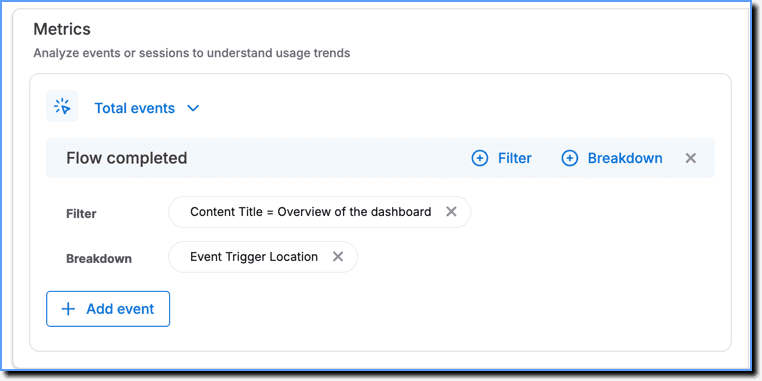
Track the number of users who completed the Overview of the dashboard Flow triggered from any source.
Event: Flow completed
Event Filter: Content Title = Overview of the dashboard
Event Breakdown: Event Trigger Location
The following are the Event Filters and Breakdowns available in Trend Insights:
Guidance (Default) events - Others
| Event | Event Filter or Breakdown | Description |
|---|---|---|
| Any Whatfix Events | Event Type | To filter based on the Whatfix events. Example: Flow started, Flow completed, and more. |
| Page View | Event Trigger Location | The Page View is triggered directly on the application's page when the end user lands on the page. |
Flow
| Event | Event Filter or Breakdown | Description |
|---|---|---|
| Flow started | Content Title | Name of the Flow |
| Segment Name | The widget segment in which the Flow is present | |
| Event Trigger Location | The location from which the Flow is triggered. Example: Flow is triggered from a Task List, Beacon, Pop-up, and more. | |
| Flow step shown | Page Tags | Page Tags added to the Flow |
| Content Title | Name of the Flow | |
| Segment Name | The widget segment in which the Flow is present | |
| Event Trigger Location | The location from which the Flow is triggered. Example: Flow is triggered from a Task List, Beacon, Pop-up, and more. | |
| Flow step completed | Content Title | Name of the Flow |
| Segment Name | The widget segment in which the Flow is present | |
| Event Trigger Location | The location from which the Flow is triggered. Example: Flow is triggered from a Task List, Beacon, Pop-up, and more. | |
| Flow backtracked 1 step | Page Tags | Page Tags added to the Flow |
| Content Title | Name of the Flow | |
| Segment Name | The widget segment in which the Flow is present | |
| Event Trigger Location | The location from which the Flow is triggered. Example: Flow is triggered from a Task List, Beacon, Pop-up, and more. | |
| Failed to launch Flow step | Page Tags | Page Tags added to the Flow |
| failure_reason | Reason for Flow step failure. | |
| Content Title | Name of the Flow | |
| possible_action | To filter based on the possible solutions to handle the Flow step failure. | |
| Segment Name | The widget segment in which the Flow is present | |
| Event Trigger Location | The location from which the Flow is triggered. Example: Flow is triggered from a Task List, Beacon, Pop-up, and more. | |
| Automated Flow stopped | Page Tags | Page Tags added to the Flow |
| Content Title | Name of the Flow | |
| Segment Name | The widget segment in which the Flow is present | |
| Event Trigger Location | The location from which the Flow is triggered. Example: Flow is triggered from a Task List, Beacon, Pop-up, and more. | |
| Flow backtracked 1 step and failed | Page Tags | Page Tags added to the Flow |
| failure_reason | Reason for Flow failure. | |
| Content Title | Name of the Flow | |
| possible_action | To filter based on the possible solutions to handle the Flow failure. | |
| Segment Name | The widget segment in which the Flow is present | |
| Event Trigger Location | The location from which the Flow is triggered. Example: Flow is triggered from a Task List, Beacon, Popup, and more. | |
| Flow closed | Page Tags | To filter based on the Page Tags added to the Flow |
| Content Title | Name of the Flow | |
| Segment Name | The widget segment in which the Flow is present | |
| Event Trigger Location | The location from which the Flow is triggered. Example: Flow is triggered from a Task List, Beacon, Popup, and more. | |
| Flow completed | Content Title | Name of the Flow |
| Segment Name | The widget segment in which the Flow is present | |
| Event Trigger Location | The location from which the Flow is triggered. Example: Flow is triggered from a Task List, Beacon, Pop-up, and more. | |
| Flow set to manual | Content Title | Name of the Flow |
| Event Trigger Location | The location from which the Flow is triggered. Example: Flow is triggered from a Task List, Beacon, Pop-up, and more. | |
| Segment Name | The widget segment in which the Flow is present | |
| Flow auto closed | Content Title | Name of the Flow |
| Event Trigger Location | The location from which the Flow is triggered. Example: Flow is triggered from a Task List, Beacon, Pop-up, and more. | |
| Flow slideshow closed | Content Title | Name of the Flow |
| Event Trigger Location | The location from which the Flow is triggered. Example: Flow is triggered from a Task List, Beacon, Pop-up, and more. | |
| Flow slideshow closed at Step 1 | Content Title | Name of the Flow |
| Event Trigger Location | The location from which the Flow is triggered. Example: Flow is triggered from a Task List, Beacon, Pop-up, and more. | |
| Flow slideshow completed | Content Title | Name of the Flow |
| Event Trigger Location | The location from which the Flow is triggered. Example: Flow is triggered from a Task List, Beacon, Pop-up, and more. | |
| Flow feedback | Feedback | Feedback provided for the Flow |
| Segment Name | The widget segment in which the Flow is present | |
| Event Trigger Location | The location from which the Flow is triggered. Example: Flow is triggered from a Task List, Beacon, Pop-up, and more. | |
| Flow slideshow restarted | Content Title | Name of the Flow |
| Event Trigger Location | The location from which the Flow is triggered. Example: Flow is triggered from a Task List, Beacon, Pop-up, and more. | |
| Flow step viewed in slideshow | Content Title | Name of the Flow |
| Event Trigger Location | The location from which the Flow is triggered. Example: Flow is triggered from a Task List, Beacon, Pop-up, and more. | |
| Flow resumed | Content Title | Name of the Flow |
| Event Trigger Location | The location from which the Flow is triggered. Example: Flow is triggered from a Task List, Beacon, Pop-up, and more. | |
| Flow slideshow started | Content Title | Name of the Flow |
| Event Trigger Location | The location from which the Flow is triggered. Example: Flow is triggered from a Task List, Beacon, Pop-up, and more. | |
| Flow end message closed by close button | Segment Name | The widget segment in which the Flow is present |
| Event Trigger Location | The location from which the Flow is triggered. Example: Flow is triggered from a Task List, Beacon, Pop-up, and more. | |
| Flow end message closed by "X" icon | Segment Name | The widget segment in which the Flow is present |
| Event Trigger Location | The location from which the Flow is triggered. Example: Flow is triggered from a Task List, Beacon, Pop-up, and more. | |
| Flow launched as pop-up | Segment Name | The widget segment in which the Flow is present |
| Event Trigger Location | The location from which the Flow is triggered. Example: Flow is triggered from a Task List, Beacon, Pop-up, and more. | |
| Flow completed with feedback | Content Title | Name of the Flow |
| Segment Name | The widget segment in which the Flow is present | |
| Event Trigger Location | The location from which the Flow is triggered. Example: Flow is triggered from a Task List, Beacon, Pop-up, and more. | |
| Flow completed without feedback | Content Title | Name of the Flow |
| Segment Name | The widget segment in which the Flow is present | |
| Event Trigger Location | The location from which the Flow is triggered. Example: Flow is triggered from a Task List, Beacon, Pop-up, and more. | |
| Branched Flow started | Content Title | Name of the Flow |
| Event Trigger Location | The location from which the Flow is triggered. Example: Flow is triggered from a Task List, Beacon, Pop-up, and more. | |
| Segment Name | The widget segment in which the Flow is present | |
| Event Trigger Location | The location from which the Flow is triggered. Example: Flow is triggered from a Task List, Beacon, Pop-up, and more. | |
| Attached flow started | Segment Name | The widget segment in which the Flow is present |
| User transitioned to another Flow | Content Title | Name of the Flow |
| Segment Name | The widget segment in which the Flow is present | |
| Event Trigger Location | The location from which the Flow is triggered. Example: Flow is triggered from a Task List, Beacon, Pop-up, and more. | |
| Flow loaded as pop-up | Segment name | The widget segment in which the Flow is present |
| Event Trigger Location | The location from which the Flow is triggered. Example: Flow is triggered from a Task List, Beacon, Pop-up, and more. | |
| Flow with wfx_play_as_popup tag skipped | Segment name | The widget segment in which the Flow is present |
| Event Trigger Location | The location from which the Flow is triggered. Example: Flow is triggered from a Task List, Beacon, Pop-up, and more. | |
| Likert Scale Feedback Responses | Segment Name | The widget segment in which the Flow is present |
| Content Title | Name of the Flow | |
| Feedback | The comments or ratings shared by different users | |
| Event Trigger Location | The location from which the Flow is triggered. Example: Flow is triggered from a Task List, Beacon, Pop-up, and more. |
Beacons
| Event | Event Filter or Event Breakdown | Description |
|---|---|---|
| Beacon shown | Content Title | Name of the individual Beacon present inside the segment |
| Segment Name | The name of the Beacon segment | |
| Event Trigger Location | The location from which the Beacon is triggered | |
| Beacon clicked | Content Title | Name of the individual Beacon present inside the segment |
| Segment Name | The name of the Beacon segment | |
| Event Trigger Location | The location from which the Beacon is triggered | |
| Beacon Hovered | Content Title | Name of the individual Beacon present inside the segment |
| Segment Name | The name of the Beacon segment | |
| Event Trigger Location | The location from which the Beacon is triggered |
Pop-ups
| Event | Event Filter or Event Breakdown | Description |
|---|---|---|
| Pop-up closed by close button | Segment Name | Name of the Pop-up |
| Event Trigger Location | The location from which the Pop-up is launched. | |
| Flow launched from Pop-up | Segment Name | Name of the Pop-up |
| Event Trigger Location | The location from which the Pop-up is launched. | |
| Pop-up skipped | Segment Name | Name of the Pop-up |
| Event Trigger Location | The location from which the Pop-up is launched. | |
| Pop-up closed | Segment Name | Name of the Pop-up. The name of the Pop-up is the name of the Flow in which the wfx_play_as_popup tag is added. |
| Event Trigger Location | The location from which the Pop-up is launched. | |
| Pop-up closed by "X" icon | Segment Name | Name of the Pop-up |
| Event Trigger Location | The location from which the Pop-up is launched. | |
| URL triggered via Pop-up | Segment Name | Name of the Pop-up |
| Event Trigger Location | The location from which the Pop-up is launched. | |
| ctxinfo_link_click | The URL of the link inside a Pop-up button. | |
| "Do not show me again" selected | Segment Name | Name of the Pop-up |
| Event Trigger Location | The location from which the Pop-up is launched. | |
| Pop-up carousel slides shown | Segment Name | Name of the Pop-up |
| Event Trigger Location | The location from which the Carousel Pop-up is launched. |
Smart Tips
| Event | Event Filter or Event Breakdown | Description |
|---|---|---|
| Smart tip loaded for page | Content Title | Name of the individual Smart Tip present inside the segment |
| Segment Name | Name of the Smart Tip segment | |
| Event Trigger Location | The location from which the Smart Tip is launched. | |
| Smart Tip shown | Page Tags | Page Tags added to the Smart Tip segment |
| Content Title | The description of the Smart Tip | |
| Segment Name | Name of the Smart Tip segment | |
| Event Trigger Location | The location from which the Smart Tip is launched. | |
| Smart Tip Step Number | The Smart Tip step displayed on a page | |
| Smart Tip element not found | Page Tags | Page Tags added to the Smart Tip segment |
| failure_reason | The reason why the element on which the Smart Tip should appear is not found | |
| Content Title | Description of the Smart Tip | |
| Segment Name | Name of the Smart Tip segment | |
| Event Trigger Location | The location from which the Smart Tip is launched. | |
| Smart Tip Step Number | The Smart Tip step displayed on a page | |
| User closed Smart Tip | Page Tags | Page Tags added to the Smart Tip segment |
| Content Title | Description of the Smart Tip | |
| Segment Name | Name of the Smart Tip segment | |
| Event Trigger Location | The location from which the Smart Tip is launched. | |
| Smart Tip Step Number | The Smart Tip step displayed on a page | |
| Smart tip autocompleted | Content Title | Description of the Smart Tip |
| Segment Name | Name of the Smart Tip segment | |
| Event Trigger Location | The location from which the Smart Tip is launched. | |
| Smart Tip Step Number | The Smart Tip step displayed on a page | |
| Validation Tip correct input | Event Trigger location | The location from which the Smart Tip is launched. |
| Segment name | Name of the Smart Tip segment | |
| Validation Tip error fixed | message | The error message shown on the Tip |
| Event Trigger Location | The location from which the Smart Tip is launched. | |
| Segment Name | Name of the Smart Tip segment | |
| condition | The condition to be satisfied for correct input. Example: email address format, character length, and more. | |
| Validation Tip error shown | message | The error message shown on the Tip |
| Event Trigger Location | The location from which the Smart Tip is launched. | |
| Segment Name | Name of the Smart Tip segment | |
| condition | The condition to be satisfied for correct input. Example: email address format, character length, and more. |
Task List
| Event | Event Filter or Event Breakdown | Description |
|---|---|---|
| Task List shown | Segment Name | The name of the Task List segment |
| Event Trigger Location | The location from which the Task List is launched. | |
| Task List closed | Segment Name | The name of the Task List segment |
| Event Trigger Location | The location from which the Task List is launched. | |
| Task List shown after nudge | Segment Name | The name of the Task List segment |
| Event Trigger Location | The location from which the Task List is launched. | |
| User interacted with Task List | Page Tags | To filter based on the Page Tags added to the Task List segment |
| Segment Name | The name of the Task List segment | |
| Event Trigger Location | The location from which the Task List is launched. | |
| Task completion | Event Trigger Location | The location from which the Task List is launched. |
| segment_occurrence | The number of times the Task List has appeared | |
| total_tasks | The total number of tasks completed | |
| Segment Name | The name of the Task List segment | |
| Task List segment completion | Event Trigger Location | The location from which the Task List is launched. |
| Segment Name | The name of the Task List segment |
Self Help
| Event | Event Filter or Event Breakdown | Description |
|---|---|---|
| Self Help shown | Page Tags | Page Tags added to the Self Help segment |
| Segment Name | The name of the Self Help segment | |
| Event Trigger Location | The location from which the Self Help is launched. | |
| Self Help closed | Segment Name | The name of the Self Help segment |
| Event Trigger Location | The location from which the Self Help is launched. | |
| Feedback sent after no search result | Segment Name | The name of the Self Help segment |
| Event Trigger Location | The location from which the Self Help is launched. | |
| Self Help feedback option selected | Segment Name | The name of the Self Help segment |
| Event Trigger Location | The location from which the Self Help is launched. | |
| Self Help feedback entered | Segment Name | The name of the Self Help segment |
| Event Trigger Location | The location from which the Self Help is launched. | |
| Email provided for Self Help feedback | Segment Name | The name of the Self Help segment |
| Event Trigger Location | The location from which the Self Help is launched. | |
| Self Help opened | Page Tags | The Page Tags added to the Self Help segment |
| Segment Name | The name of the Self Help segment | |
| Event Trigger Location | The location from which the Self Help is launched. | |
| Self Help search | Search Term | The search terms used to search for content within the Self Help segment |
| Segment Name | The name of the Self Help segment | |
| Event Trigger Location | The location from which the Self Help is launched. | |
| Search Results | Successful or unsuccessful search results obtained for a search term | |
| New content notification badge hovered | Event Trigger Location | The location from which the Self Help is launched. |
| New content notification badge selected | Event Trigger Location | The location from which the Self Help is launched. |
QuickRead
| Event | Event Filter or Event Breakdown | Description |
|---|---|---|
| QuickRead Links Consumed | Event Trigger Location | The location from which QuickRead is launched. |
| Content Type | The type of content that the end user has consumed using QuickRead | |
| Segment Name | The name of the Self Help segment in which QuickRead is enabled. | |
| QuickRead Feedback | Event Trigger Location | The location from which QuickRead is launched |
| Segment Name | The name of the Self Help segment in which QuickRead is enabled | |
| Feedback option | The feedback option, agree or disagree, that is selected by the end user | |
| QuickRead response | Search Term | The search terms used to search for content within the Self Help segment |
| Event Trigger Location | The location from which QuickRead is launched | |
| Segment Name | The name of the Self Help segment in which QuickRead is enabled | |
| Event Trigger page url | The URL from which the QuickRead response is triggered | |
| Response success | The status of whether QuickRead was able to provide a response or not | |
| QuickRead autoquestion | Segment Name | The name of the Self Help segment in which QuickRead is enabled |
| CTA | The buttons, Show me or No thanks, clicked by end users on the QuickRead onboarding experience tooltip | |
| Event Trigger Location | The location from which QuickRead is launched | |
| Auto Query | The question searched by QuickRead when the end user clicks the Show me button on the QuickRead onboarding experience tooltip |
Self Help (New)
Self Help (New) is a Beta feature. To enable this feature, contact support@whatfix.com.
| Event | Event Filter or Event Breakdown | Description |
|---|---|---|
| Self Help shown | Segment Name | The name of the Self Help segment |
| Event Trigger Location | The location from which the Self Help is launched | |
| Page url | The page URL from which the new Self Help is launched | |
| Clicks on content within Explorer | Segment Name | The name of the Self Help segment |
| Content title | The name of the content opened within Explorer | |
| Search term | The search terms used to search for content within the Self Help segment | |
| Content type | The type of content that the end user has consumed within Explorer | |
| New content | The content consumed by the end user is new | |
| Event Trigger Location | The location from which the Self Help is launched | |
| Clicks on Explorer icon within the Pin on roll over | Segment Name | The name of the Self Help segment |
| Event Trigger Location | The location from which the Self Help is launched | |
| Page url | The page URL from which the new Self Help is launched | |
| Clicks on Feedback icon on Pin on roll over | Segment Name | The name of the Self Help segment |
| Event Trigger Location | The location from which the Self Help is launched | |
| Page url | The page URL from which the new Self Help is launched | |
| Clicks on options within no search results screen | Segment Name | The name of the Self Help segment |
| Event Trigger Location | The location from which the Self Help is launched | |
| Search term | The search terms used to search for content within the Self Help segment | |
| Page url | The page URL from which the new Self Help is launched | |
| Type | The type of option clicked by the end user on the no search results screen such as provide feedback, email support, and more. | |
| Clicks on Self Help (New) icon of Pin | Event Trigger Location | The location from which the Self Help is launched |
| Page url | The page URL from which the new Self Help is launched | |
| Clicks on the Chatbot icon in the top navigation bar | Segment Name | The name of the Self Help segment |
| Page url | The page URL from which the new Self Help is launched | |
| Event Trigger Location | The location from which the Self Help is launched | |
| Clicks on the Explorer icon in the top navigation bar | Segment Name | The name of the Self Help segment |
| Event Trigger Location | The location from which the Self Help is launched | |
| Page url | The page URL from which the new Self Help is launched | |
| Clicks on the Feedback icon in the top navigation bar | Segment Name | The name of the Self Help segment |
| Event Trigger Location | The location from which the Self Help is launched | |
| Page url | The page URL from which the new Self Help is launched | |
| Feedback from end users | Segment Name | The name of the Self Help segment |
| Attachment | Attachments added by the end user in the Self Help feedback | |
| Page url | The page URL from which the QuickRead feedback was submitted | |
| Email Id | The email ID of the end user who submitted the feedback | |
| Event Trigger Location | The location from which the Self Help is launched | |
| No search results feedback | Segment Name | The name of the Self Help segment |
| Search term | The search terms used to search for content within the Self Help segment | |
| Event Trigger Location | The location from which the Self Help is launched | |
| Feedback text | The feedback text provided when no results are found in the Explorer search | |
| Search suggestions shown | Segment Name | The name of the Self Help segment |
| Search query | The query entered by the end user in Explorer | |
| Event Trigger Location | The location from which the Self Help is launched | |
| Self Help (New) Explorer | Segment Name | The name of the Self Help segment |
| Search term | The search term entered by the end user | |
| Page url | The URL of the page from which the search result is fetched in Explorer | |
| Search success | The status indicating whether the search returned a result in Explorer | |
| Search time | The duration of the search operation in Explorer | |
| Search type | The type of search performed in Explorer, such as recent search | |
| Event Trigger Location | The location from which the Self Help is launched |
Static Content
| Event | Event Filter or Event Breakdown | Description |
|---|---|---|
| Video link clicked | Content Title | The name of the video |
| Segment Name | The name of the widget segment in which the video is present | |
| Event Trigger location | The location from which the video is played. Example: The video is played from a Task List, Self Help, and more. | |
| Link opened | Content Title | The name of the link |
| Segment Name | The name of the widget segment in which the link is present | |
| Event Trigger location | The location from which the link is triggered. Example: The link is triggered from a Task List, Self Help, and more. | |
| ctxinfo_link_click | The URL of the link | |
| Link opened in new format | Content Title | The name of the link |
| Segment Name | The name of the widget segment in which the link is present | |
| Event Trigger location | The location from which the link is triggered. Example: The link is triggered from a Task List, Self Help, and more. | |
| Article viewed | Content Title | The name of the article |
| Segment Name | The name of the widget segment in which the article is present | |
| Event Trigger location | The location from which the article is launched. Example: The article is triggered from a Task List, Self Help, and more. | |
| Article closed | Content Title | The name of the article |
| Segment Name | The name of the widget segment in which the article is present | |
| Event Trigger location | The location from which the article is launched. Example: The article is triggered from a Task List, Self Help, and more. | |
| Pdf Viewed | Content Title | The name of the PDF |
| Segment Name | The name of the widget segment in which the PDF is present | |
| Event Trigger location | The location from which the PDF is launched. Example: The PDF is triggered from a Task List, Self Help, and more. | |
| IMAGE_START | Content Title | The name of the image |
| Segment Name | The name of the widget segment in which the image is present | |
| Event Trigger location | The location from which the image is launched. Example: The image is triggered from a Task List, Self Help, and more. |
Survey
| Event | Event Filter or Event Breakdown | Description |
|---|---|---|
| Survey shown | Event Trigger Location | The location from which the survey is launched |
| Segment Name | The name of the Survey | |
| Survey abandoned | Event Trigger Location | The location from which the survey is launched |
| Segment Name | The name of the Survey | |
| Survey submit | Event Trigger Location | The location from which the survey is launched |
| Segment Name | The name of the Survey | |
| Survey closed | Event Trigger Location | The location from which the survey is launched |
| Segment Name | The name of the Survey | |
| Survey Maximize | Event Trigger Location | The location from which the survey is launched |
| Segment Name | The name of the Survey | |
| Survey Minimize | Event Trigger Location | The location from which the survey is launched |
| Segment Name | The name of the Survey | |
| Survey Refresh | Event Trigger Location | The location from which the survey is launched |
| Segment Name | The name of the Survey |
Launcher
| Event | Event Filter/Event Breakdown | Description |
|---|---|---|
| Launcher loaded | Content Title | The name of the Launcher |
| Segment Name | The name of the Launcher segment | |
| Event Trigger Location | The location from which the Launcher is launched. | |
| Launcher clicked | Content Title | The name of the Launcher |
| Segment Name | The name of the Launcher segment | |
| Event Trigger Location | The location from which the Launcher is clicked. |
Extension
| Event | Event Filter/Event Breakdown | Description |
|---|---|---|
| Extension generated | Event Trigger Location | The location from which the Extension is generated |
| Extension updated | Event Trigger Location | The location from which the Extension is updated |
| Extension installed | Event Trigger Location | The location from which the Extension is installed |
App (Custom) Events
| Event | Event Filter/Event Breakdown | Description |
|---|---|---|
| Any App Event | Event Type | To filter based on User Actions, events captured by the Whatfix API, and more. > [!WARNING] > Note: > > For other App (Custom) events, Event Attributes captured as part of the User Actions, appear as Event Filters and Breakdowns. For more information, see Add Event Attributes to Trend Insights. |