Custom Repository
Understand Repository Integration Status
The Integrated Repository section displays the integration status of all the repositories that you have linked with DAP on OS.
This enables you to do the following:
- Keep track of the integrated repositories
- Take necessary actions in case the repository integration gets delayed or fails.
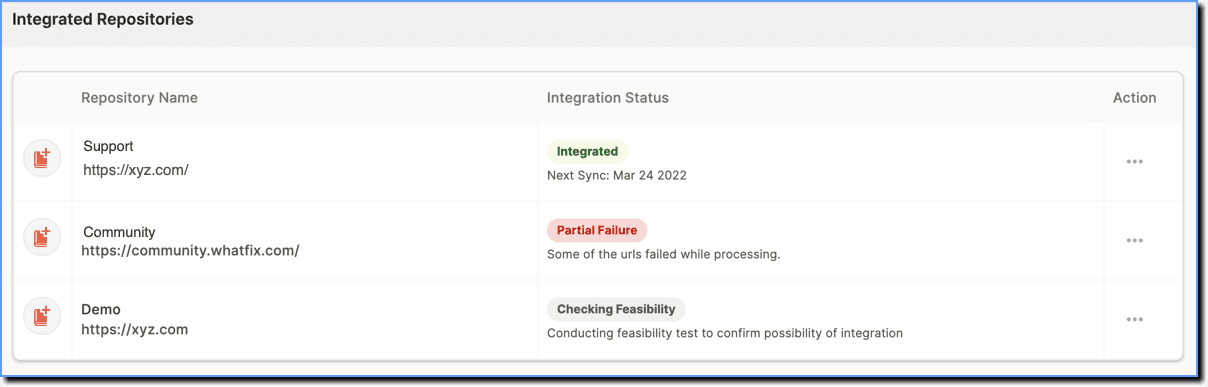
Use the following steps to view the Integrated Repository section:
The following table lists the different Repository Integration Statuses:
| #### Status | #### Description |
|---|---|
| Saved as Draft Complete the process to integrate your content | This status appears when the content creator has initiated the integration, that is, clicked the application tile to integrate but has not clicked the Integrate button. |
| Checking feasibility Conducting feasibility test to confirm the possibility of integration | This status appears when the content creator has added a custom repository for the first time, but the integration has not been enabled. |
| Scheduled Content sync is initiated soon | This status appears when the content creator has already submitted the integration request, that is, clicked the Integrate button. But Whatfix hasn't started crawling the repository content. > [!WARNING] > Note: > > This status only appears for out-of-the-box applications. |
| Processing Content sync takes 2-3 working days | This status appears when the content repository is getting crawled. > [!WARNING] > Note: > > This status appears after Repository integration is enabled by Whatfix. |
| Integrated Next sync: {MM DD YYYY} | This status appears when the content crawling process is completed, and the repository has been integrated. > [!WARNING] > Note: > > This status appears for both new and existing Repository integration. |
| Updating Content Content Sync takes 24-72 hours to complete | This status appears when Whatfix is re-crawling an existing repository. |
| Failed Comments will depend upon the failure reason | This status appears when Whatfix faces some issues while crawling content and could not integrate the repository. > [!WARNING] > Note: > > This status appears for both new and existing repository integration. |
| Partial failure Whatfix couldn't integrate all the repository URLs. Try again. | This status appears when Whatfix wasn't able to crawl all the content of the repository and couldn't complete the integration. > [!WARNING] > Note: > > This status appears for both new and existing repository integration. |
| Paused Integration is currently in the Paused state | This status appears when the content creators have disabled auto-updates for a repository integration. |