Choose an installation method
Mass Deployment of DAP on OS
System level, or bulk deployment, of the DAP on OS app, places an application distributor of the DAP on OS at the system level, inside the Program Files directory for Windows or Applications for MacOS.
The installation of the DAP on OS app on a user level is triggered when a user signs into a common Windows machine.
For example, if you have a Windows or MacOS computer that is used by multiple people in your organization. Each user has a separate user profile and login credentials for the same computer. Once the IT Admin carries out a system-level distribution, a distributor file for the DAP on OS app is added to the computer. Now, every time a new user logs into their respective profile, DAP on OS is installed in the local device of that particular user.
Before proceeding with the mass deployment method of DAP on OS, ensure you have an Org ID. If not, contact Whatfix Representative.
Windows
Use the following steps to mass deploy DAP on OS app on a Windows system:
- Download DAP on OS' most recent bulk MSI installer from the following add-on URLs:
| US Accounts | EU Accounts |
|---|---|
| Download | Download |
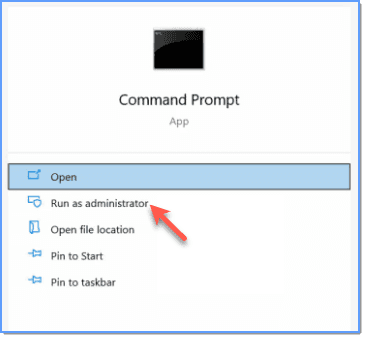
- In the Windows search bar, type cmd, and then click Run as administrator.
The Command Prompt opens in Admin mode.
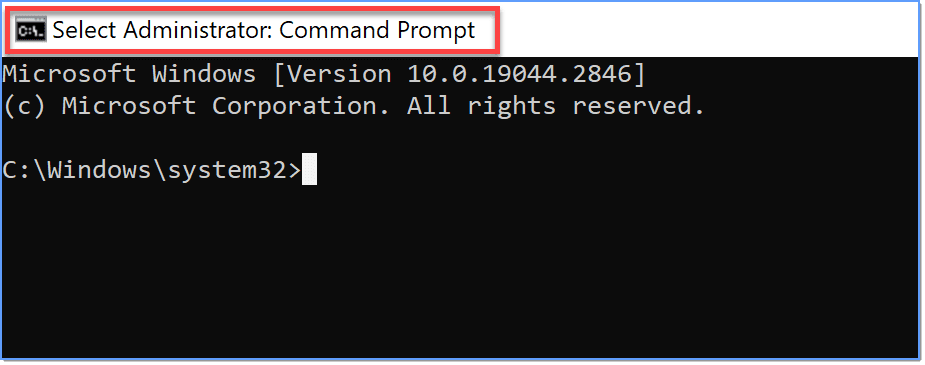
- Run the following command to install the WhatfixPlayerMassDeployment file.
msiexec.exe /i WhatfixPlayerMassDeployment.msi ORG="OrgID" /q /l*v out.txtThe following table explains each parameter and whether or not it is required in the code:
| Parameter | Description | Mandatory |
|---|---|---|
| ORG | The ORG is a unique identifier assigned to your organization. To get the value for ORG (i.e., Enterprise ID), contact your Whatfix Representative. | Mandatory value |
| /l*v | These are the installer logs. | Optional |
| /q | This parameter ensures that the installation of the DAP on OS app is done silently on your desktop. | Optional |
- Press the Enter key.
If there is no error message, the installation is successful.
Now, every time a user signs up or signs into the Windows machine for the first time, the DAP on OS app is installed in the localappdata of their respective user profile.
MacOS
Use the following steps to mass deploy DAP on OS on MacOS systems:
- Set up the following bash script in your respective Mobile Device Management (MDM) software like Jumpcloud.
- For Silicon processors
#!/bin/bash
rm -rf /tmp/*
cd /tmp
curl -O https://addons.whatfix.com/Desktop/WhatfixHub_apple_silicon_installer.zip
unzip WhatfixHub_apple_silicon_installer.zip
cd /tmp/WhatfixHub/
./whatfixhub_installer.sh -org {org_id}- For Intel processors
#!/bin/bash
rm -rf /tmp/*
cd /tmp
curl -O https://addons.whatfix.com/Desktop/WhatfixHub_apple_intel_installer.zip
unzip WhatfixHub_apple_silicon_installer.zip
cd /tmp/WhatfixHub/
./whatfixhub_installer.sh -org {org_id}- Replace the package URL with the latest DAP on OS installer package link.
curl -O https://addons.whatfix.com/Desktop/WhatfixHub_apple_intel_installer.zip
unzip WhatfixHub_apple_silicon_installer.zip| MacOS Silicon | MacOS Intel | |
|---|---|---|
| US Accounts | Copy Link | Copy Link |
| EU Accounts | Copy Link | Copy Link |
- Replace the
org_idwith your org ID.
cd WhatfixHub/
./whatfixhub_installer.sh -org {org_id}