User Actions
What are User Action Completion Rules?
The User Action Completion Rule (Track User Action) defines the action that end users perform in the application to indicate the completion of a specific User Action.
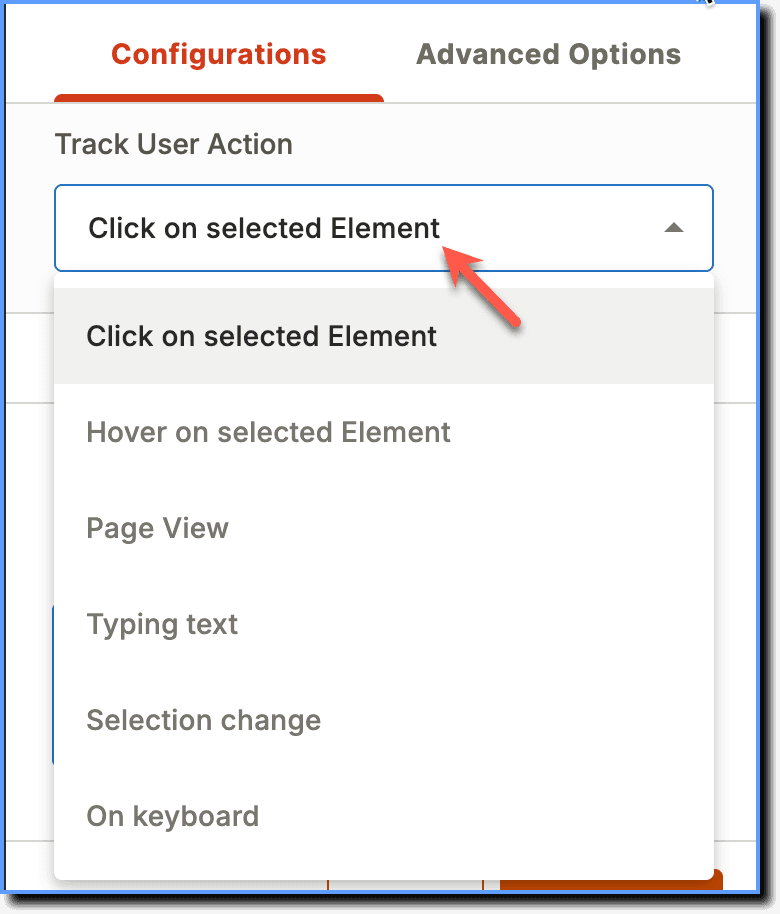
Whatfix Analytics captures User Action events only when end users complete the selected User Action.
The following is the list of User Action Completion Rules available and their corresponding use cases:
| Completion Rule | Description and Use Case |
|---|---|
| Click on selected Element | The User action is marked complete when end users click the element. This applies when the User Action is created on a clickable button, link, or HTML element. |
| Hover on selected Element | The User action is marked complete when end users hover their cursor over the element. |
| Page View | The User action is marked as complete when the page (URL) on which the User Action is created loads. > [!WARNING] > Note: > > Whatfix enables you to edit the Page View URL. For more information, see Can I edit the Page View completion rule for User Actions? |
| Typing text | The User action is marked complete when end users stop typing for a couple of seconds. This applies in text boxes where user inputs are required. |
| Selection change | The User action is marked complete when end users click the selected element in a drop-down or choose from a set of options. This applies when users are expected to select an element in a drop-down (in the collapsed state) or choose an option. |
| On keyboard | The User action is marked complete when end users click the Enter or Tab key on the keyboard. > [!WARNING] > Note: > > If you've set a User Action to be completed when the Enter key is pressed on the keyboard, Whatfix tracks the key press on any element, not just the one where the User Action is created. |